Showing posts with label Finance-Cash Management. Show all posts

Sunday, 2 April 2023

Automatic Bank Statement Reconciliation in Oracle Cloud Cash Management

Automatic bank statement reconciliation in cash management in oracle cloud


In this blog we are going to discuss how automatic reconciliation in done in oracle cloud cash management and why reconciling the transaction is an Important task in any ERP.


Let us first understand what is bank statement reconciliation in oracle cloud cash management.

What is Bank Statement Reconciliation in Orcale Cloud Cash Management 


Bank statement reconciliation in Oracle Cloud cash management refers to the process of verifying and matching the transactions recorded in an organization's bank statement with the transactions recorded in its accounting system.

This is typically done to ensure that all transactions have been accurately recorded and to identify any discrepancies or errors that may require further investigation. By reconciling bank statements in Oracle Cloud, organizations can maintain accurate financial records and identify any potential issues before they become more serious.

Oracle Cloud offers a variety of tools and features to help organizations automate and streamline the bank statement reconciliation process. These tools typically involve importing bank statements into the system, matching transactions with those recorded in the accounting system, and resolving any discrepancies that are identified. The reconciliation process can be customized to meet the specific needs of the organization, and reports can be generated to provide an overview of the reconciliation process and any issues that were identified.

What is automatic bank statement reconciliation in oracle cloud cash management


Automatic bank statement reconciliation in Oracle Cloud cash management is a feature that enables organizations to automatically match transactions recorded in their bank statements with transactions recorded in their accounting system. This is done using predefined matching rules that are configured in Oracle Cloud.

The process of automatic bank statement reconciliation in oracle cloud cash management typically involves importing bank statements into Oracle Cloud, mapping the bank statement fields to the corresponding fields in the accounting system, and setting up matching rules that define how transactions should be matched.

Once the matching rules have been configured, Oracle Cloud automatically matches transactions in the bank statement with those recorded in the accounting system based on the defined rules. Any discrepancies that are identified are flagged for further investigation.

The advantage of automatic bank statement reconciliation in oracle cloud cash management is that it can significantly reduce the time and effort required for manual reconciliation, allowing organizations to focus on more strategic tasks. It also reduces the risk of errors and ensures that financial records are accurate and up-to-date.

How to configure Automatic bank statement reconciliation in oracle cloud cash management


Setting up automatic bank statement reconciliation in Oracle Cloud cash management involves several steps. Here are the general steps involved in setting up this feature:

1 Define Bank/Brach/Account: The first step in automatic bank statement reconciliation in oracle cloud cash management is to define the bank, bank branches and a account in Oracle Cloud cash management by providing details such as bank account number, bank name, and bank branch.

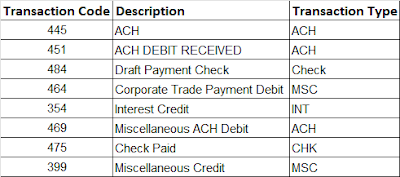
2. Define transaction codes: Define transaction codes that are used to identify transactions in the bank statement. These codes are typically provided by the bank and are used to categorize transactions such as deposits, withdrawals, fees, and interest. Some of the examples for transaction codes are given below.

Automatic Bank Statement Reconciliation in Oracle Cloud Cash Management


3. Define matching rules: Define matching rules that specify how transactions in the bank statement should be matched with transactions in the accounting system. This includes rules such as matching based on transaction amount, transaction date, and transaction code. Further matching can be one to one , one to many, many to one and many to many.


Automatic Bank Statement Reconciliation in Oracle Cloud Cash Management

Automatic Bank Statement Reconciliation in Oracle Cloud Cash Management


4. Define Tolerance rules : Tolerance rules in Oracle Cloud Cash Management define the acceptable differences or variances between the amounts recorded in a bank statement and the amounts recorded in an organization's accounting system. Tolerances can be created on date/days or on amount (value or percentage) or combination of both. If the bank statement lines lies within the tolerance rule range it will be reconciled with the system transactions.


Automatic Bank Statement Reconciliation in Oracle Cloud Cash Management


5. Define Parsing Rules : One of the important setup in automatic bank statement reconciliation in oracle cloud cash management is defining parse rules. In simple language Parse rules are basically rules created to move data from one filed to another in other words parse rules transforms data from bank statement while bank statement import process. 

Consider the below example for better understanding


Automatic Bank Statement Reconciliation in Oracle Cash Management


In the above example the there are 3 rules created. Rule 1 says that for the the transaction code 165 whatever ( (X~) ) is coming in "Customer reference" filed in bank statement move it to "Reconciliation reference" filed in system. It is simply moving the content of Customer reference filed in bank statement to Reconciliation reference filed of the system. 

Now this was a simple example the scenarios can be complex as well in that case we need toh write parse rules accordingly.

6. Define Reconciliation rule set :  In the previous steps we have created matching rules and tolerances rules. The next  important setup in automatic bank statement reconciliation in oracle cloud cash management is to combine those rules under a single rule to make a combination and this is called as Reconciliation rule set.

7.  Assign the Reconciliation Rule seta and Parse rule set to bank accounts : The next step is to assign the parse rule set and reconciliation rule set toh the bank accounts under controls tab in bank account section. 


Automatic Bank Statement Reconciliation in Oracle Cloud Cash Management


8. Define transmission configurations : A transmission configuration is a set of specific transmission details. Configuration of transmission protocol is necessary if you want to automate the integration of your ERP system with bank. These integrations can be inbound in case of bank statement retrieval or it can be outbound in case of AP payment and positive pay. Below you can see how to configure transmission protocol for bank statement retrieval.

All the values provided in the fields are bank specific and you need discuss all these with the banks before setting this up.


Automatic Bank Statement Reconciliation in Oracle Cloud Cash Management


Note: 

PGP Public Encryption Key :→ This will be provided by the bank (upload the file through Import and Export, file name should be ending with _public.key.)

PGP Private Signing Key: → This will be generated by our IT team (upload the file through Import and Export, file name should be ending with _secret. Key.)

9. Define payment system : Define the payment system for the banks for which automatic bank statement reconciliation is required. Assign the transmission protocol the payment system defined.


10: Now at the month end you can run the automatic bank statement reconciliation process: Run the automatic bank statement reconciliation process in oracle cloud cash management to match transactions in the bank statement with transactions in the accounting system based on the predefined matching rules.

11. Review and resolve discrepancies: Review any discrepancies identified during the reconciliation process and resolve them as necessary.

By following these steps, organizations can set up automatic bank statement reconciliation in Oracle Cloud and improve the accuracy and efficiency of their financial operations.



Automatic bank statement reconciliation in oracle cloud cash management | How to reconcile bank statement automatically in oracle cloud | Automatic bank statement reconciliation | Steps to configure automatic bank statement reconciliation || Automatic Bank Statement Reconciliation in Cash Management


Wednesday, 21 July 2021

How to read BAI2 bank statement format


How to read BAI2 bank statement format


How to read BAI2 bank statement file format


In this post we will see in detail how to read a BAI2 bank statement file format in detail by ourselves.

Organizations are uses a variety of bank statement file formats from their bank about their monthly/ yearly activities in a given account. The most common bank statement file formats which are available and used by all is MT940 and BAI2 file format for bank statement. Today in this blog we will see how to read a BAI2 bank statement file format in a easy manner.

BAI2 bank statement file format/specification in detail


How to read BAI2 bank statement format

How to read BAI2 bank statement format

In this post we will see a sample BAI2 bank statement in detail and will also see how to read a BAI2 bank statement format in detail. We will also see all BAI2 bank statement format specifications in details.


Sample BAI2 bank statement file format/Specifications 

First of all lets see an example of sample BAI2 bank statement file. How does MT940 bank statement/format file looks like.

Below is the sample BAI2 bank statement file format file for oracle


How to read BAI2 bank statement format

How to read BAI2 bank statement file format


Now Let us know How to read BAI2 bank statement file format in detail  


All tags in BAI2 bank statement format are explained below in detail


01 : File Header

01,BOFXX22XXX,169550,190904,08:54:22,1080363,80,,2/


How to read BAI2 bank statement format


02: Group Header

02,169550,BOFX22XXX,1,191010,2400,,2/


How to read BAI2 bank statement format

How to read BAI2 bank statement file format


03: Account Identifier

03,60087,GBP,010,-5655975,,,015,3734274,,,045,3734274,,,040/


How to read BAI2 bank statement format


088: Additional information

88,75114973,,,072,0,,,074,0,,,075,0,,,100,17689,,/

This line consists of additional information and this can follow a 03 line or 16 line.


How to read BAI2 bank statement format


16: Transaction detail

16,699,1700,,,216462,TEST


How to read BAI2 bank statement format


49: Account Trailer

49,92401704,3/


How to read BAI2 bank statement format

How to read BAI2 bank statement format


98: Group Trailer

98,4188040765,1,6/


How to read BAI2 bank statement format


99: File Trailer

99,4188040765,1,8/


How to read BAI2 bank statement format


How to read BAI2 bank statement format | BAI2 bank statement specifications || BAI2 sample || BAI2 bank statement format ||  BAI2 bank statement sample file|

Sunday, 27 June 2021

MT940 bank statement file format

MT940 bank statement file format


MT940 bank statement file format in oracle

In this post we will see the sample MT940 file format in oracle

MT940 is a standard bank statement format for electronic bank statements. It is used by many banks around the world to provide customers with a detailed record of their account transactions.

An MT940 bank statement file typically includes information about the account holder, the bank's name and address, and a list of transactions that have taken place on the account over a specific period of time. Each transaction is usually identified by a unique reference number, a date, a description, and an amount.

The MT940 bank statement file format is designed to be easy to read and understand, and it can be used by accounting software to import the data automatically. This makes it a popular choice for businesses and individuals who want to keep track of their finances.

If you have an MT940 bank statement file, you can usually open it using any text editor or spreadsheet program. However, if you want to import the data into accounting software, you may need to use a specific tool or program that is compatible with the MT940 format.


MT940 sample bank statement file format


MT940 bank statement file format oracle

MT940 bank statement file format oracle


MT940 bank statement file format oracle || MT940 bank statement sample file || MT940 sample bank statement file format 

Wednesday, 22 July 2020

How to load Bank statement in oracle cloud

How to load bank statement in Oracle Cloud


How to load bank statement in Oracle Cloud


In this post we will see how to load a bank statement in oracle cloud cash management

There are majorly two types of bank statements MT940 and BAI2 bank statement format. Let us see how to load or import a bank statement in oracle cloud cash management.


How to load or Import a bank statement file in oracle cloud/fusion cash management


Bank statement files are loaded in oracle and then are reconciled against your payments and receipts. This is a small but very critical business process to reconcile balances. This process of loading the bank statement is generally scheduled in a business ( as bank sends payment files on daily basis )and does not require manual intervention, unless their is a error, but we can upload bank statement manually as well in oracle cloud cash management. Let us see how we load/import a bank statement manually in oracle cloud and how we reconcile it against payment.


Below are the detailed steps given on how to load/Import a bank statement in oracle cloud cash management.


Step 1: Place the bank statement file on UCM server.

Navigator >File Import and Export


How to load Bank statement in oracle cloud

                                        How to load/Import Bank statement in oracle cloud cash management


Step 2: Click on Plus (+) Icon and Choose the bank statement file which you want to load. Make sure in Account you select “fin/cash Management/import” Click save. File will be saved


How to load Bank statement in oracle cloud

How to load/Import Bank statement in oracle cloud cash management


How to load Bank statement in oracle cloud


Step 3: Navigate to Cash Management module

Navigator >Bank Statement and Reconciliation


How to load Bank statement in oracle cloud

How to load/Import Bank statement in oracle cloud cash management


 Step 4: Task Pane>Load and Import bank statement


How to load Bank statement in oracle cloud

How to load/Import Bank statement in oracle cloud cash management


Step 5: Select the parameters

Format : your bank statement format (most of the cases it will be MT940 or BAI2)

Data File : Select the file which you have uploaded on UCM from the drop drown.

Click Submit. Your bank statement job will be submitted.


How to load Bank statement in oracle cloud

                                                                    How to load/import Bank statement in oracle cloud cash management

Step 6: Check you bank statement here after filling the search criteria.


How to load Bank statement in oracle cloud


How to load Bank statement in oracle cloud cash management||How to import Bank statement in oracle cloud/fusion/ load bank statement in oracle cloud

Wednesday, 3 June 2020

How to read MT940 bank statement format

How to read MT940 bank statement format


How to read MT940 bank statement format

In this post we will see in detail how to read a MT940 bank statement format in detail by ourselves.


MT940 bank statement file format/specification in detail

In this post we will see a sample MT940 bank statement in detail and will also see how to read a mt940 bank statement format in detail. We will also see all MT940 bank statement format specifications in details.


Sample MT940 bank statement format/Specifications 

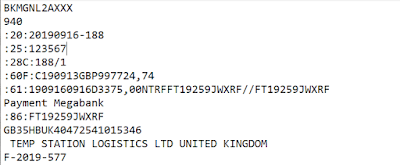
First of all lets see an example of sample MT940 bank statement file. How does MT940 bank statement/format file looks like.

Below is the sample MT940 bank statement file for oracle.


How to read MT940 bank statement

How to read MT940 bank statement format/ MT940 file format sample/example


Now Let us know How to read MT940 bank statement format in detail  


All tags in above MT940 bank statement format/sample/example are explained below in detail


20 : This is transaction reference number

It has statement generation date along with few characters. This is mandatory tag.


25: This is Account number

This is bank Account number for the bank. This should exactly match the account number in system. This is also a mandatory tag.


28C: This is statement number Tag

This is automatic generated by bank and this is your bank statement number. This is also mandatory tag.


60F or 60M: This is opening balance Tag

This is a mandatory tag. This shows the the opening balance for that bank account.

You can read it like this C/D(credit or debit) followed by date, followed by currency, followed by amount

See the example for reference

C190913GBP997724,74 ( here C shows it’s credit balance then we have date at the time of this balance, then currency, then amount, “,” indicates .(decimal) and 74 comes after decimal ))


61: This is actual statement line Tag

:61:1909160916D3375,00NTRFFT19259JWXRF//FT19259JWXRF

How to read this : 190916 is date 19th sep 2016, then we have month and year again, then D indicates it’s a debit amount i.e payment and then we have actual amount, then we have transaction type code “NTRF” then we have customer reference (used for reconciliation).


86: This is additional information tag

This will have any additional information relate to payment and receipts. This is Optional Tag.


62F or 63M: This is closing balance tag

This is mandatory tag. This will show the closing balance for the account.


64: This shows Funds available to the owner

This is optional tag. This shows the funds available to the owner 


How to read MT940 bank statement format|MT940 bank statement specifications||MT940 sample|| MT940 bank statement format|| MT940 bank statement sample file| MT940 format example || MT940 format sample || Mt940 File format oracle

Sunday, 31 May 2020

Types of Bank statement formats in oracle

Types of Bank Statement Formats in oracle cloud


Types of Bank statement formats in oracle cloud


In this post we will see the different types of bank statement formats available across the banks globally in oracle cloud and what are the main types of bank statement format in oracle cloud.

Bank statement is the record of your payments and receipts for a particular period of time. This is generally sent by bank to the customers every month end.

In short you can say a bank statement is a list of all transactions for a bank account over a set period, usually monthly.  

The statement includes deposits, charges, withdrawals, as well as the beginning and ending balance for the period. 

Here we will see what are the most widely used bank statement formats by banks in oracle for reconciliation purpose.


Types of bank statement formats in oracle cloud


a). SWIFT MT940 Bank statement format

b). BAI2 bank statement format


SWIFT MT940 Bank statement format

This is an electronic bank statement which by developed by SWIFT. It is a well standard structured customer statement.

Below is the example of MT940 bank statement format

Types of bank statement formats in oracle

Types of bank statement formats in oracle


BAI2 Bank statement Format 

BAI stands for Bank Administration Institute. It is a financial services association, they have developed a bank statement format called as  BAI format, which is a standard to enable cash management balance reporting.

Below is the example of BAI2 bank statement format

Types of bank statement formats in oracle

Types of bank statement formats in oracle


Bank statement formats in oracle cloud | Types of bank statements in oracle cloud

Thursday, 28 May 2020

Bank statement transaction codes in oracle cloud

How to Create bank statement transaction codes in oracle cloud


What is bank statement transaction codes 

In this post we will see how to create bank statement transaction codes in oracle cloud cash management.


Bank statement transaction codes are standardized codes used to identify the type of transaction that has occurred on a bank statement. These codes provide a uniform way of classifying transactions and help to ensure that bank statements are consistent across different financial institutions.

One must must define bank transaction codes in Oracle Cash Management if we wish to use Oracle's electronic bank statements with the Auto Reconciliation features.

Below are the detailed steps given to create bank statement transaction codes in oracle cloud in cash management.


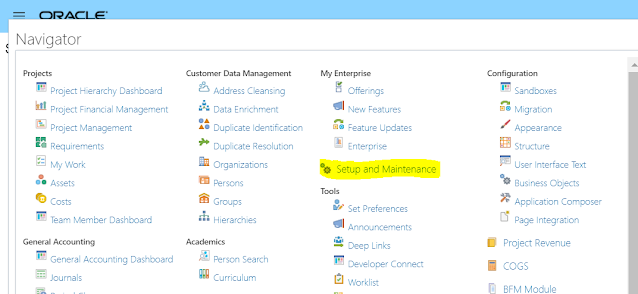
Step 1: Navigator>Setup and maintenance

how to create Bank Statement transaction Codes in oracle cloud


bank statement transaction codes in oracle cloud


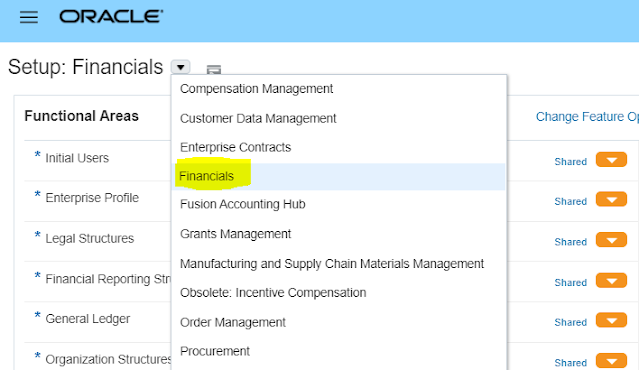
Step 2 : Select offering as Financials

                                                 how to create bank statement transaction codes in oracle cloud

How to Create bank statement transaction codes

                                                            Create bank statement transaction codes in oracle cloud


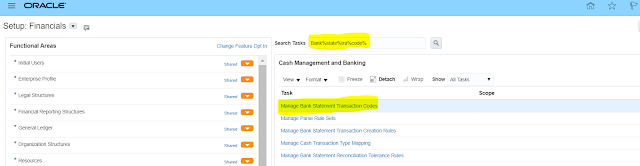
Step 3 : Search for the task Manage bank statement transaction codes


How to Create bank statement transaction codes in oracle cloud


Step 4 : Now click on the Plus (+) Icon


                                                 How to create bank statement codes in oracle cloud cash management

Create bank statement transaction codes in oracle


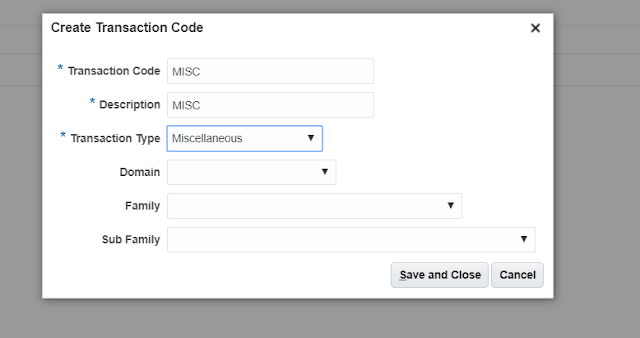
Step 5 : Enter the Transaction code , Description and Transaction Type and click save and close


How to create bank statement codes in oracle cloud

how to create bank statement transaction codes in oracle cloud


After creation of bank statement transaction in code in cash management will appear like this


how to Create bank statement transaction codes in oracle


How to create bank statement transaction codes in oracle cloud 


Popular Posts