https://omg10.com/4/11341387 HSRoracentre: Finance-Accounts Payables
Showing posts with label Finance-Accounts Payables. Show all posts

Tuesday, 3 June 2025

Oracle Intelligent Document Recognition (IDR): AI-Powered Invoice Automation in Fusion Cloud

Oracle Intelligent Document Recognition (IDR): AI-Powered Invoice Automation in Fusion Cloud

Oracle Fusion IDR: How AI and ML Revolutionize Document Processing in ERP


Oracle Fusion IDR (Intelligent Document Recognition): AI-Powered Efficiency for Finance Teams


Introduction - What is Oracle Intelligent Document Recognition (IDR)

In today’s fast-paced digital finance environment, manual invoice processing is outdated, error-prone, and resource-intensive. Oracle Fusion has responded to this challenge with a game-changing feature: Intelligent Document Recognition (IDR).

Powered by Artificial Intelligence (AI) and Machine Learning (ML), IDR in Oracle Fusion enables businesses to automate document ingestion, extract data intelligently, and reduce human intervention, making your finance operations faster, smarter, and more accurate.


What is Oracle IDR?

IDR (Intelligent Document Recognition) is Oracle Fusion’s embedded capability that automates the extraction of key data fields from incoming documents—especially supplier invoices—by applying AI and ML-based pattern recognition.


Key Features of Oracle IDR: AI, ML & Automation

  • Automated invoice scanning and data extraction
  • AI-based field mapping with self-learning capabilities
  • Seamless integration with Oracle Fusion Payables
  • Reduced dependency on third-party OCR tools
  • Continuous improvement through Machine Learning

How IDR Uses AI and Machine Learning

Oracle IDR stands apart because it uses built-in AI/ML models trained on thousands of invoice formats to auto-learn and improve over time.


AI/ML Functionalities in IDR:

  • Pattern Recognition
  • Smart Field Extraction
  • Supplier Matching
  • Confidence Scoring
  • Feedback Loop

Solving Business Challenges with Oracle Fusion IDR


Problem

Solution via IDR

Manual data entry

AI auto-extracts invoice data

Delayed invoice processing

Instant ingestion and validation

High error rate

AI-based confidence tagging & validation

Compliance risks

Standardized and audit-ready workflows

Operational cost

Less manpower needed for data entry


Implementing Oracle IDR: Configuration & Setup Steps

Prerequisites for IDR Implementation

  • Fusion ERP Cloud with Payables module
  • IDR enabled through the Oracle Cloud Service Entitlement
  • Valid email inbox for invoice ingestion

High-Level Configuration Steps for IDR

  1. Enable IDR Profile Options
  2. Configure Email Inbound Channel
  3. Train the Model (Optional)
  4. Review & Approve
  5. Integrate with Approval Workflows

Oracle Fusion IDR: How AI and ML Revolutionize Document Processing in ERP


Real Business Impact

  • 60–80% reduction in invoice processing time
  • 40–60% cost savings on manual processing
  • 90%+ accuracy on field extraction after initial learning phase
  • Significant reduction in payment delays and late fees

Why Choose Oracle IDR Over Traditional OCR?


Traditional OCR

Oracle IDR

Template-dependent

AI/ML-powered dynamic learning

Requires custom scripting

Out-of-the-box in Oracle Fusion

Limited scalability

Scales with invoice volume

Third-party integration needed

Native to Oracle Cloud ERP


Conclusion: Transforming AP with Oracle IDR

Oracle Intelligent Document Recognition (IDR) represents a significant leap forward in Accounts Payable (AP) automation within Oracle Fusion Cloud Applications. By seamlessly integrating Artificial Intelligence (AI) and Machine Learning (ML) into the invoice processing workflow, IDR goes far beyond traditional OCR tools.

This intelligent solution empowers organizations to:

  • Drastically Reduce Manual Effort: Automating invoice data extraction frees up AP teams from repetitive, manual data entry, allowing them to focus on value-added activities like exception handling and analysis.
  • Enhance Data Accuracy: The continuous learning capabilities of IDR lead to higher accuracy over time, minimizing errors that can lead to payment delays or reconciliation issues.
  • Accelerate Invoice Processing: A faster AP workflow contributes to quicker payment cycles, improved vendor relationships, and better cash flow management.
  • Strengthen Audit & Compliance: Automated processes provide a clear and reliable audit trail, enhancing procurement compliance and overall financial governance.

Implementing Oracle IDR is not just about adopting a new technology; it's about transforming your Accounts Payable operations from a cost center into a strategic function. By embracing these capabilities and adhering to best practices, your organization can achieve unprecedented levels of efficiency, accuracy, and control in invoice management within your Oracle Fusion ERP system.


Sunday, 30 June 2024

Dynamic Discount in Oracle Cloud/Fusion Finance

Dynamic Discount in Oracle Cloud/Fusion Finance

Dynamic Discounting in Oracle Cloud Finance

Dynamic Discounting in Oracle Cloud


Dynamic discounting is a feature in Oracle Cloud that allows organizations to optimize their cash flow and enhance supplier relationships by offering early payment discounts on invoices. This functionality benefits both buyers and suppliers by improving liquidity and financial efficiency.

Key Features of Dynamic Discounting in Oracle Cloud Finance:


1. Flexible Discount Terms: Buyers can define flexible discount terms and conditions based on their cash flow and liquidity needs. Suppliers can accept or negotiate discount terms, providing a mutually beneficial agreement.

2. Automated Discount Calculations: Oracle Cloud automatically calculates early payment discounts based on the agreed terms, reducing manual efforts and potential errors.
The system adjusts discount amounts dynamically based on the payment date, ensuring accuracy and transparency.

Dynamic Discounting in oracle cloud - Comparison to Standard payment terms


Dynamic Discount in Oracle Cloud
Reference - Oracle


How Dynamic Discounting works in oracle cloud/fusion finance


Dynamic Discount in Oracle Cloud/Fusion Finance


Dynamic Discount in Oracle Cloud/Fusion Finance


Dynamic Discount in Oracle Cloud/Fusion Finance


Benefits of Dynamic Discounting in Oracle Cloud/Fusion Finance:


  • Cost Savings: By taking advantage of early payment discounts, organizations can significantly reduce their procurement costs.

  • Improved Supplier Loyalty: Faster payments improve supplier satisfaction and loyalty, leading to more favorable terms and stronger partnerships. Offering early payment discounts strengthens supplier relationships by providing them with quicker access to funds. Improved payment practices can lead to better terms and collaboration with suppliers, fostering long-term partnerships.

  • Enhanced Cash Flow: Dynamic discounting helps organizations manage their cash flow more effectively, ensuring they have the liquidity needed for other strategic investments.

  • Operational Efficiency: Automation of discount calculations and payments reduces manual workload, minimizes errors, and enhances overall operational efficiency.

Dynamic discounting in Oracle Cloud is a powerful tool that provides financial flexibility and operational efficiency, fostering better supplier relationships and contributing to the overall financial health of the organization.


Dynamic Discounting in Oracle Cloud| Dynamic Discount in Fusion finance


Thursday, 13 June 2024

eInvoicing for Saudi Arabia In Oracle Fusion Cloud


eInvoicing for Saudi Arabia In Oracle Fusion Cloud

eInvoicing for Saudi Arabia In Oracle Fusion Cloud


eInvoicing for Saudi Arabia In Oracle Fusion Cloud


E-invoicing in Saudi Arabia is governed by the Zakat, Tax, and Customs Authority (ZATCA, previously known as GAZT). The requirements are designed to ensure transparency, compliance, and standardization in the invoicing process. Here are the key requirements for e-invoicing in Saudi Arabia:


1. Compliance Timeline:

  • Phase 1 (Generation Phase): Effective from December 4, 2021. Businesses are required to generate and store electronic invoices and notes.
  • Phase 2 (Integration Phase): Effective from January 1, 2023. Businesses must integrate their e-invoicing systems with ZATCA's platform.

2. Invoice Format:

  • Electronic invoices must be generated in a structured format (e.g., XML) or an unstructured format (e.g., PDF/A-3 with XML embedded).
  • The invoices must include mandatory fields as specified by ZATCA.

    Mandatory Fields:

  • Seller's and buyer's name, address, and VAT registration number.
  • Invoice date and unique invoice number.
  • Description of goods or services provided.
  • Quantity and unit price of goods or services.
  • VAT rate and amount for each line item.
  • Total amount payable inclusive of VAT.

3. Security Features:

  • Invoices must include a QR code for simplified invoice validation.
  • Digital signatures may be required to ensure the authenticity and integrity of the invoices.

4. Storage and Archiving:

  • E-invoices must be stored electronically and be accessible for at least 6 years.
  • Invoices must be stored in a tamper-evident format to prevent unauthorized alterations.

5. Integration with ZATCA:

  • Businesses must integrate their systems with ZATCA’s platform for real-time or near-real-time invoice reporting.
  • The system should be capable of generating unique cryptographic stamps.

6. Types of Invoices:

  • Standard Tax Invoices: Issued for B2B transactions. Must include all mandatory fields and the QR code.
  • Simplified Tax Invoices: Issued for B2C transactions. These also need to include a QR code but have fewer mandatory fields compared to standard tax invoices.

7. Technical Requirements:

  • Systems must comply with the technical specifications outlined by ZATCA, including API standards for integration.
  • The system should be able to handle different types of VAT rates, discounts, and other commercial terms.

8. Penalties and Compliance:

  • Non-compliance with e-invoicing regulations can result in penalties, including fines and other administrative actions.

9. Training and Readiness:

  • Businesses are encouraged to train their staff and ensure that their systems are ready for compliance with e-invoicing requirements.
  • For more detailed and updated information, it is recommended to refer to the official ZATCA guidelines and consult with local tax advisors.

Solution: - eInvoicing for Saudi Arabia In Oracle Fusion Cloud


  • Create Invoices: Generate invoices in Oracle Fusion as usual, ensuring that all required information, such as customer details, itemized charges, VAT amounts, and invoice dates, are accurately entered.
  • Tax Compliance: Verify that VAT and other applicable taxes are correctly calculated and reflected on the invoices.
  • E-Invoice Generation: Use Oracle Fusion’s e-invoicing features to generate the invoice in the required electronic format (typically XML or JSON). This may involve using a specific e-invoice template compliant with ZATCA standards.

·  Middleware system – Oracle Integration Cloud (OIC) 

     OIC will receive the invoice data from Oracle Fusion in addition to this it generates UUID, Invoice counter value, previous invoice hash and invoice hash values to the invoice data and converts the file into ZATCA acceptable format


     Integration with ZATCA Portal:

      API Integration: Implemented API integration between Oracle Fusion and the ZATCA e-invoicing portal. Oracle Fusion may need to connect with ZATCA’s system using APIs to upload invoices directly.


eInvoicing for Saudi Arabia In Oracle Fusion Cloud


Sunday, 9 April 2023

Procure to Pay cycle in Oracle Cloud

Procure to Pay (P2P) Cycle in Oracle cloud


Procure to pay (P2P) cycle overview in oracle cloud

The Procure-to-Pay (P2P) cycle, also known as Purchase-to-Pay, is a process that covers the steps involved in procuring goods or services for a business or organization, and paying for them.

The Procure-to-Pay cycle helps businesses to streamline the procurement process and ensure that the goods or services are received on time and at the best possible price. It also ensures that payments are made accurately and on time, which helps to maintain good relationships with suppliers.

What is P2P cycle or Procure to pay cycle in oracle cloud/fusion


Oracle Cloud provides a comprehensive P2P-Procure-to-Pay solution that includes modules for procurement, inventory management, supplier management, and financials. It also includes features such as automated approval workflows, supplier self-service portals, and mobile access to help streamline the process and improve efficiency.

The Procure-to-Pay P2P cycle in Oracle Cloud is a comprehensive process that includes the following steps:


Procure to Pay (P2P) Cycle in Oracle Cloud


1. Purchase order requisition 

2. Request for Quotation (RFQ)

3. Quotations

4. Creating a Purchase Order

5. Receive Goods/Services

6. Creating an Invoice

7. Supplier Payment

8, Reconciliation 


1. Create purchase order requisition 

Requisitioning: The procure to pay (P2P) cycle in Oracle cloud begins with the creation of a requisition by a requester, which includes information such as the item or service requested, quantity, and delivery date.

2. Request for Quotation 

The user generates a request for a quotation after creating requisitions by providing all the required information (RFQ). An RFQ is a request for quotes, also known as an invitation to bid, that a business sends to possible suppliers.

A request for quotation (RFQ) is a letter that the supplier receives outlining the goods or services required and the buyer's pricing. Any other terms and conditions pertaining to the purchase are also included in the RFQ.

3. Quotations 

In the P2P (Procure-to-Pay) cycle, a quotation is a formal document issued by a supplier to a buyer in response to a request for quotation (RFQ). The RFQ typically specifies the goods or services that the buyer requires, and the supplier's quotation will include details such as the price, quantity, delivery terms, payment terms, and any other relevant information.

4. Create a Purchase order 

Once the Quotation is approved the the next step is to create a purchase order in the system.

A purchase is an essential document in the Procure-to-Pay (P2P) process in oracle cloud, as it authorizes a supplier to deliver products or services and provides evidence of the agreement between the two parties. It serves as a legal document that protects both the buyer and the supplier, ensuring that the buyer receives the correct products or services at the agreed price and the supplier is paid promptly.

The purchase order contains detailed information, such as the item description, quantity, price, delivery date, payment terms, and shipping instructions. The supplier must fulfill the terms and conditions specified in the PO, including delivering the products or services as agreed upon.

5. Receive Goods/Services

In the Procure to Pay (P2P) cycle, receiving is the process of acknowledging the delivery of goods or services from a supplier. Receiving is an important step in the P2P cycle because it allows organizations to ensure that they have received the correct quantity and quality of goods or services that they have ordered.

The receiving process typically involves comparing the goods or services received against the purchase order and verifying that they meet the required specifications. This can include inspecting the goods for damage or defects, verifying quantities, and confirming that the goods are of the quality specified in the purchase order.

Once the receiving process is complete, the receiving department will typically update the purchase order to reflect the goods or services that have been received, and will notify the accounts payable department that the invoice can be processed for payment.

Effective receiving processes can help organizations to minimize errors and discrepancies in their procurement processes, which can improve efficiency and reduce costs.

6. Create Invoice

Once the receipt is created into the system next step is to create the invoices into the system. This invoice is matched against the purchase order and receipt in Oracle Cloud to ensure that the correct items or services have been received.

7. Create Payment

Once the invoices are entered into the system the next step is to create the payment for the invoices as in when you receive the payment from supplier.

8. Reconciliation 

Finally, the accounts payable balance is reconciled in Oracle Cloud to ensure that all invoices have been paid and the balance is up-to-date.

By following these steps in Oracle Cloud, the Procure to Pay cycle can be completed accurately and efficiently, ensuring that the supplier is paid in a timely manner and the accounts payable balance is up-to-date.


procure to pay cycle in oracle cloud || what is p2p cycle in oracle cloud || what is procure to pay cycle in oracle cloud

Friday, 19 November 2021

Supplier is not appearing on the invoice

 Supplier is not appearing in the supplier LOV on the AP invoice


Supplier doesn't appear on the invoice in supplier column even after the supplier and supplier site are created


After creating the supplier and supplier site when creating the AP invoice not able to see the supplier in the supplier LOV, supplier doesn't appear in the  supplier LOV


In this post we will see a common issue related to AP invoice where we are not able to see the supplier which is created in the system. The supplier and it's related sites are created in the system but still supplier is not appearing on the invoice. 


Let us see the cause for this issue

Supplier is created in the system also supplier sites are created correctly but supplier site assignment's are not done.

Supplier site assignment is a must to setup before you created any AP invoice in the system.

Now let's us see the solution for the issue

in order to resolve this issue , please follow the below steps 

Search for the supplier

Navigator>Procurement>Suppliers

select the task manage supplier and search for the supplier


Supplier is not appearing on the invoice

Supplier is not appearing on the AP invoice


Supplier is not appearing on the invoice

Supplier doesn't appear in the supplier LOV on the invoice


Now navigate to the supplier site under site tab and click on Edit pencil icon


Once the site is opened under the site assignment tab assign the business unit for which this site is applicable.


Supplier is not appearing on the invoice


One this is done save and close the page. Go to AP invoices supplier will appear on the invoice under supplier LOV


Supplier is not appearing on the invoice
Supplier doesn't appear on the AP invoice in supplier LOV


Friday, 3 September 2021

What is Multi period accounting in oracle cloud

 Multi Period Accounting in oracle cloud


What is Multi Period accounting in Oracle Cloud


In this post we will see in detail " What is Multi period accounting in Oracle cloud" with detailed example.


Multi period accounting concept was introduces in oracle during it's R12 release. Using Multi period accounting (MPA) we can create accounting for a single accounting event for more than one general ledger (main accounting) period. In other words multi period accounts allows users to create the accounting entries in more than one accounting period for the give single accounting event.

This functionality is leveraged to recognize revenue or prepaid expenses over multiple accounting periods.


Expenses incurred for a yearly subscription for a software license , rental lease paid in advance , Insurance premium paid in advance for whole year are some good examples of Multi period accounting in oracle.


Let us understand Multi period accounting in oracle cloud with a business case


Case 


Let us assume there is an organization " HSR organization " which receives payable invoice for Insurance premium. The invoice received is for insurance for the whole next one year. As per the  accounting principle “Expense to be recognized as and when services are provided”, following would happen as far as accounting of the Insurance invoice is concerned:


  • The expense of Insurance Invoice must not be recognized the day invoice is entered. This need to be done as insurance service is yet NOT delivered on the day respective invoice is recorded.

  • Insurance service is going to be expensed out over a period of coming Year, hence the insurance expense must be recorded in future accounting periods as and when it comes.

Accounting using Multi period accounting functionality in Oracle cloud


Let us assume the Insurance Invoice case as mentioned below:

Invoice Amount: 12000 (which is the premium for the whole next year over 12 months)

The Insurance premium is paid fully in one Installment 
 
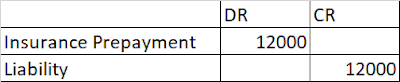
As per above transaction expected accounting entry of the invoice will be as follows:

Accounting entry:


Multi period accounting in oracle cloud


                                                             Multi period accounting in oracle cloud


But as we know this premium is paid for 12 months hence expense must be distributed over 12 months ( assuming that the premium for every month is same )

Expense which will be recognized monthly


Multi period accounting in oracle cloud


                                               what is Multi period accounting in oracle cloud


In the above example the insurance amount expensed out monthly is same (equal =1000 each month ). 


There could be case where we have to expense 10% amount each month , or some fixed amount in each month based on formula. All this can be achieved using multiperiod accounting in oracle fusion/cloud.  


Multi period accounting in oracle cloud|| What is Multi period accounting in oracle|| Multi period accounting

Sunday, 8 August 2021

Accrue on Receipt vs. Accrue at Period End in Oracle: A Comprehensive Guide

 Difference between Accrue on receipt and Accrue at period end


Difference between Accrue on receipt and Accrue at period end


In the complex world of Oracle Financials and Supply Chain Management, managing the timing of expense recognition is paramount for accurate financial reporting. Two critical methods within Oracle Purchasing dictate this timing for procured goods and services: Accrue on Receipt and Accrue at Period End.

Understanding the nuances between these two accrual methods is essential for finance professionals, procurement specialists, and auditors working with Oracle E-Business Suite (EBS) or Oracle Fusion Cloud Applications (Cloud ERP). This comprehensive guide will demystify both approaches, detailing their setup, accounting impact, and helping you choose the right strategy for your business.

Difference between accrue on receipt and accrue at period end in oracle


Understanding Oracle Accrual Methods: Receipt vs. Period End

The accrual method chosen for your purchase orders in Oracle Purchasing determines precisely when a liability is recognized for goods or services received but not yet invoiced. This choice directly impacts your General Ledger (GL), Accounts Payable (AP), and Inventory valuation.

Accrue on receipt

When the option Accrue on receipt is selected, the accounting entries are immediately generated and sent to general ledger whenever a receipt is created and saved. This is also called as “online accrual”

Accrue on receipt is a feature in Oracle Purchasing that allows you to automatically accrue accounting entries for goods or services received, even if you have not yet received the invoice for those goods or services.


When accrue on receipt is enabled for a purchase order, the system creates a liability account entry for the amount of the goods or services received as soon as the receipt is entered in the system. This means that the accounting entry is made when the goods are received, rather than when the invoice is received and processed.


The accrue on receipt feature can be useful for businesses that want to track their liabilities for goods and services received, even if they haven't yet received the invoice. It can also help to reduce the time and effort required to process invoices and ensure that accounting records are up-to-date and accurate.


In Oracle Purchasing, you can enable accrue on receipt for a purchase order by selecting the "Accrue on Receipt" option on the "Terms" tab of the purchase order. You can also set up accrual rules and thresholds to control how and when the accrual entries are created.


It's important to note that while accrue on receipt can help to streamline accounting processes and provide more accurate financial reporting, it does not eliminate the need for processing invoices and making payments on time. Accruals should still be reconciled with vendor invoices and payments should be made according to the agreed upon terms.


Accrue at period end

On the other end when the option Accrue at period end is selected , the accounting entries are not generated when the receipt is created or saved , instead the accounting entries are generated at the period end and that time sent to GL. For this run Receipt accrual period end process. 

Accrue at period end is a feature in accounting that allows businesses to recognize expenses or revenues at the end of an accounting period, even if they have not yet received or paid for goods or services.


When accrue at period end is enabled, a business can estimate the amount of an expense or revenue that will be incurred or earned during a particular accounting period, and create an accounting entry for that amount at the end of the period. This allows the business to match expenses with the revenue they generate, and provides a more accurate representation of the business's financial performance during the period.


For example, a business might accrue expenses for salaries, rent, or utilities at the end of a period based on estimated amounts, even if the actual bills for those expenses haven't been received yet. Similarly, a business might accrue revenue for services provided during the period, even if the customer hasn't yet been invoiced.


The accrue at period end feature can be useful for businesses that have significant timing differences between when expenses or revenues are incurred or earned, and when they are actually paid or received. It can also help to ensure that financial statements accurately reflect the business's financial position and performance during the period.

Typically, expense items are accrued at period end and inventory items are accrued at receipt.


Configuring Accrual Options in Oracle Purchasing (EBS & Fusion)

The choice of accrual method in Oracle Purchasing is highly configurable and can be set at various levels, impacting how the system defaults this option. This flexibility allows businesses to tailor their accrual accounting based on item type and business process.

Where to Set Accrual Options:

The accrue on receipt or accrue at period end option can be defaulted from several places, with a hierarchy determining the final value on a Purchase Order (PO) distribution line:

  1. Item Master Level:
    • In Oracle EBS: Navigate to Inventory > Items > Master Items (or Organization Items). On the "Purchasing" tab, you'll find the "Accrue at Receipt" checkbox (or similar setting).
    • In Oracle Fusion Cloud: Go to Product Management > Product Information Management > Manage Items. On the "Purchasing" tab, locate the accrual options.
    • Note: This is a common default for inventory items.
  2. Supplier Site Level:
    • In Oracle EBS: Go to Payables > Suppliers > Supplier Sites. On the "Purchasing" tab, you can set an accrual default for all purchases from this site.
    • In Oracle Fusion Cloud: Navigate to Procurement > Suppliers > Manage Suppliers. Within the supplier site details, look for purchasing defaults.
  3. Purchase Order (PO) Line/Distribution Level:
    • The accrual option can be manually overridden or defaulted onto each PO line's distribution. This provides the most granular control.
    • In Oracle EBS: On the PO line details, under "Distributions."
    • In Oracle Fusion Cloud: On the PO line, then navigate to "Distributions."
    • Note: The option here takes precedence over Item Master or Supplier Site defaults.

Accrue on Receipt vs. Accrue at Period End: A Comparative Analysis

Choosing between these methods impacts your financial statements, operational efficiency, and reporting.

Feature / Consideration

Accrue on Receipt

Accrue at Period End

Timing of Accrual Entry

Immediately upon receipt

At the end of the accounting period (batch process)

GL Transaction Volume

Higher (each receipt generates an accrual entry)

Lower (aggregated into single or few entries at month-end)

Liability Recognition

Real-time, more accurate

Deferred, requires period-end adjustment

Inventory Valuation Impact

Immediate update to inventory asset value

May require separate reconciliation if inventory item

Typical Use Cases

Inventory items, capital assets, services with immediate recognition needs

Expense items, high-volume non-inventory purchases

Period-End Close Impact

Less manual work for accruals, focus on RNI reconciliation

Requires running the "Uninvoiced Receipts Accrual" process

Audit Trail

Very detailed, line-item specific accruals

Less granular, consolidated accruals

System Performance

Potential for more real-time GL impact

Centralized processing, potentially impacting month-end close window


what is difference between Accrue on receipt and Accrue at period end

Sunday, 11 July 2021

How to setup document sequencing in Payables invoices

How to setup document sequencing in oracle Payables invoices 


Today in this post we will see how to setup or define document sequencing in payables invoices in oracle cloud/fusion.


What is document sequencing?


Document sequencing is a very common requirement for any business in real time scenario. This is usually done from audit and control point of view. This helps us in finding any missing or deleted transaction/ invoice in the system. Hence this serve as a tracking purpose as well.


How to setup document sequencing in payables invoices


Below are the details steps given on how to define document sequencing in payables invoices in oracle cloud/fusion in details.

Document sequencing in oracle payables can be setup for different types of documents or document sequence categories. Let us consider an example, you have decide to assign the sequence of numbers to the Payables document category Standard invoices Invoices. Then, each standard invoice you create will have a unique voucher number assigned as per the sequence.


Below are the some of the predefined categories that are provided by oracle in Payables:

  • Standard Invoices
  • Credit Memo Invoices
  • Debit Memo Invoices
  • Interest Invoices
  • Electronic Payments
  • Check Payments
  • Clearing Payments


How to setup/define document sequencing in oracle Payables invoices

Step 1: Login to Oracle and Navigate to Setup and Maintenance


How to setup document sequencing in oracle Payables

how to setup document sequencing in oracle payables invoices 


Step 2: Select setup as financials >In search task search for " Manage Payables Document Sequences" and click on the task. Payables document Sequencing window will open up. 


How to setup document sequencing in oracle Payables

how to define/configure document sequencing in oracle payables 


Step 3: Select Application as Payables and click on search to see any existing sequence in the system 


How to setup document sequencing in oracle Payables

How to setup document sequencing in Payables invoices 

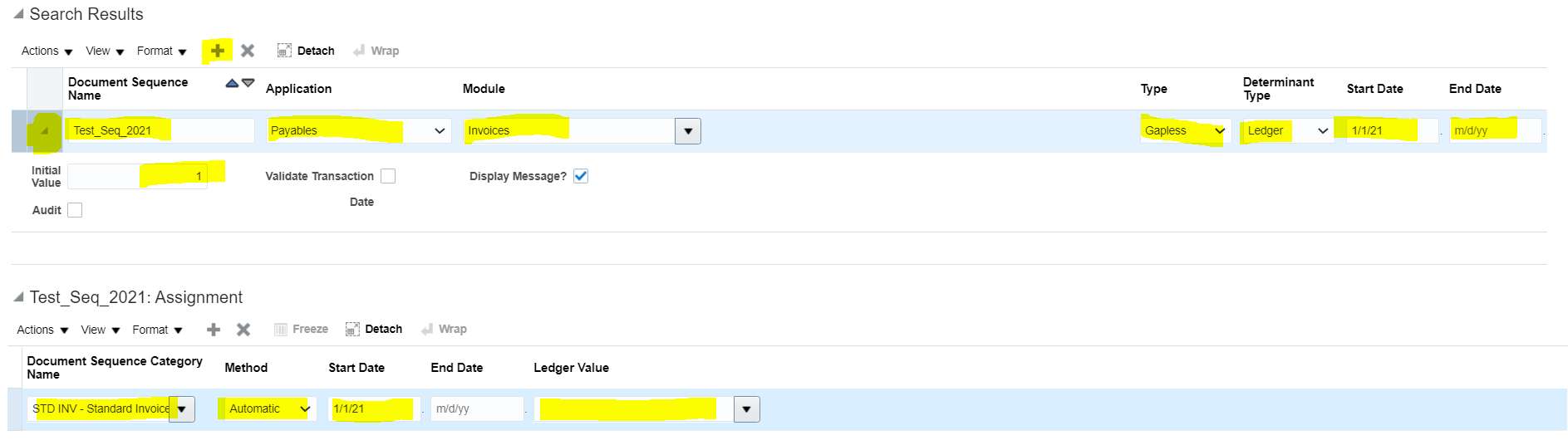
Step 4 : To create a new document sequence for payables in oracle click on the Plus Icon.

Give the sequence name, Application , Module , Sequence type, Start date , End date. Provide the Initial value for the sequencing ( if you are keeping the sequence manual or Gapless)

Under Assignment Provide the document category for which this sequence will be applicable also provide start date and ledger name.


How to setup document sequencing in oracle Payables


How to setup document sequencing in Payables invoices 


Monday, 22 February 2021

Prepayment Accounting entries in Oracle

Prepayment Accounting entries in Oracle


Prepayment Accounting Entries in Oracle Accounts Payables

Prepayment Accounting entries in Oracle Accounts Payables

In this post we will see end to end prepayment accounting entries in oracle accounts payables (Prepayment accounting entries), its Payment and It’s application on an standard invoice as well.

Let’s understand what is Prepayment Invoice in oracle Accounts Payables.

Prepayment Invoice: whenever you make any advance payment to a supplier you record this as Prepayment Invoice in Oracle accounts payables

Below are the complete Prepayment Accounting entries in Oracle Accounts Payables

Whenever a Prepayment Invoice is created , below are the prepayment accounting invoice entries are created in oracle payables

Account

DR

CR

Prepaid Expense Account

Debit


Liability Account


Credit

 Whenever a Prepayment Invoice is paid, below accounting entries are created in oracle payables

Account

DR

CR

Liability Account

Debit


Cash Account


Credit

 Whenever Invoice is created for Expense , below accounting entries are created in oracle payables

Account

DR

CR

Expense Account

Debit


Liability Account


Credit

Now whenever the Prepayment is applied to the invoice for the same supplier it will reverse the original prepaid invoice accounts creates the following accounts

Account

DR

CR

Liability Account

Debit


Prepaid Expense Account


Credit

 In the above example we have seen how prepayment accounting entries are generated in oracle accounts payables.

 Prepayment Accounting entries in Accounts Payables|| Prepayment Accounting entries in oracle|| Prepayment accounting entries

Popular Posts